


LiftMaster – 828LM Troubleshooting Guide

Jan 19, 2026
 17
17
The LiftMaster 828LM Internet Gateway has two LED indicators that show power, internet, and MyQ device status.
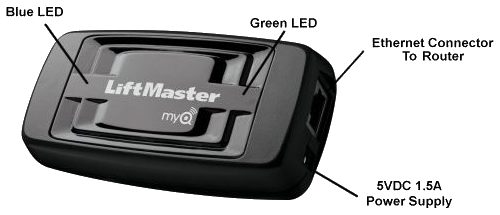
Green LED — Power / Internet Status
-
Off: No power
→ Check the power adapter and outlet. -
Blinking Green: Powered on but no internet connection
→ Check Ethernet cable, router connection, and internet service. -
Solid Green: Connected to the network and the internet
→ Normal operation.
Blue / Yellow LED — MyQ Device Status
-
Solid Blue: MyQ device(s) successfully learned
→ Normal operation. -
Solid Yellow: Learn mode active
→ Ready to add a MyQ device. -
Blinking Yellow: Reset or device enrollment in progress.
Quick Tips
-
Power-cycle the gateway and router if the green LED is blinking.
-
Ensure the Ethernet cable is connected directly to the router.

